Case study
Viraasat
A private family archive inspired by conversations with my grandparents, built to preserve the stories behind a family tree.
Why I started
Preserving our families’ stories
Viraasat (विरासत / وراثت) means heritage, legacy, familial traits passed down over generations. For me, it is also a call to preserve the stories that make us a family.
In 2024, I sat down with my grandparents and asked them to tell me about their lives. We talked about their childhoods, their friends and hobbies, what they remembered of their own parents and grandparents, how they met, the work they did, what they had hoped for, and the things that had gone right and wrong along the way. I had known them all my life, but I came away feeling as though I had met another side of them. There was so much in those conversations that no family tree could have shown me.
I also realized how much of our family history lives only in their memories. In my family, as in many South Asian families, stories have been passed down by speaking to one another. We have few written records that reach beyond my grandparents’ generation, and they are among the last people who can tell me about relatives I never met. If I do not make time to listen and record those stories now, parts of that history may disappear with them.
Viraasat grew out of that worry and that sense of discovery: a way to preserve the family stories that written records alone cannot tell. I want my grandparents' and parents' generations to have a place to tell their stories, and mine and the generations after us to keep building on them.
I want families to build this record together: the people who came before us, the places they lived, and the historical context of their lives. Adding someone should be an opportunity to dig through cherished memories and ask a loved one about what we don't know. Future generations can keep contributing to the tree to better understand themselves and preserve it for their own descendants.
Why this matters
A digital heirloom, chronicled by real-life conversations
We have an obligation to preserve these stories while we can still ask the people who remember them. They help us understand who shaped our grandparents and parents, how those lives shaped us, and the historical context our families belong to. Their habits, decisions, and experiences tell us about the people they were, beyond their names and dates.
Written genealogical traditions in South Asia extend back centuries. For example,Hindu pilgrimage registers in India preserve genealogies from long before that period. That collection also documents gaps in whose lives were recorded, including women. The collection describes one community’s record-keeping tradition. For Viraasat, I am starting with the stories my own family holds in living memory.
Adding someone should prompt a conversation
Viraasat is a collaborative genealogy platform intended to become a digital heirloom. Adding someone to the tree should feel like revisiting cherished memories and giving them a lasting home. The existing prompts for everyday life and a single story support that intention. Optional answers let someone begin with what they know.
A gap in knowledge can become a reason to call a loved one: “What do you remember about them?” I hope this gives relatives a reason to talk about their family history and contribute to it together. Beta research will test whether that happens.
Who I am building for
I am starting with three overlapping roles in a family. These generational examples give me a starting point for recruiting participants. Research will help me understand how technical confidence, memory, and willingness to share vary within each family.
- The current custodian. A tech-savvy Gen X relative may be ready to organize the archive but know little beyond a certain branch or generation. They need a manageable starting point and a way to invite relatives who can fill in the gaps.
- The relatives who remember. A WhatsApp-savvy Baby Boomer may remember parents and grandparents whom younger relatives never met. They may welcome a chance to reminisce when someone asks. Familiar language and gentle prompts should make sharing approachable; research will explore when contributing together is easier than alone.
- The next generation of custodians. Millennials and Gen Z may arrive wanting to understand their roots and eventually nurture the record for their own descendants. The experience needs to make room for small contributions now and continuing care over time.
The tradeoff
A richer biography asks more of the contributor. The four-step flow creates space for memories, but it also adds steps compared with the original short form. Optional details and preserved drafts are the current response. The research question is whether that extra space feels inviting or like work, especially when relatives contribute together.
Product walkthrough
Exploring the family archive
Today, a family can create a private circle, add relatives and their relationships, and move between a lineage graph, a timeline, and each person's profile. That profile is where the details from a conversation can live: a story, a photograph, a place, or a note someone else in the family can add to. Invitations let relatives participate without making the archive public.
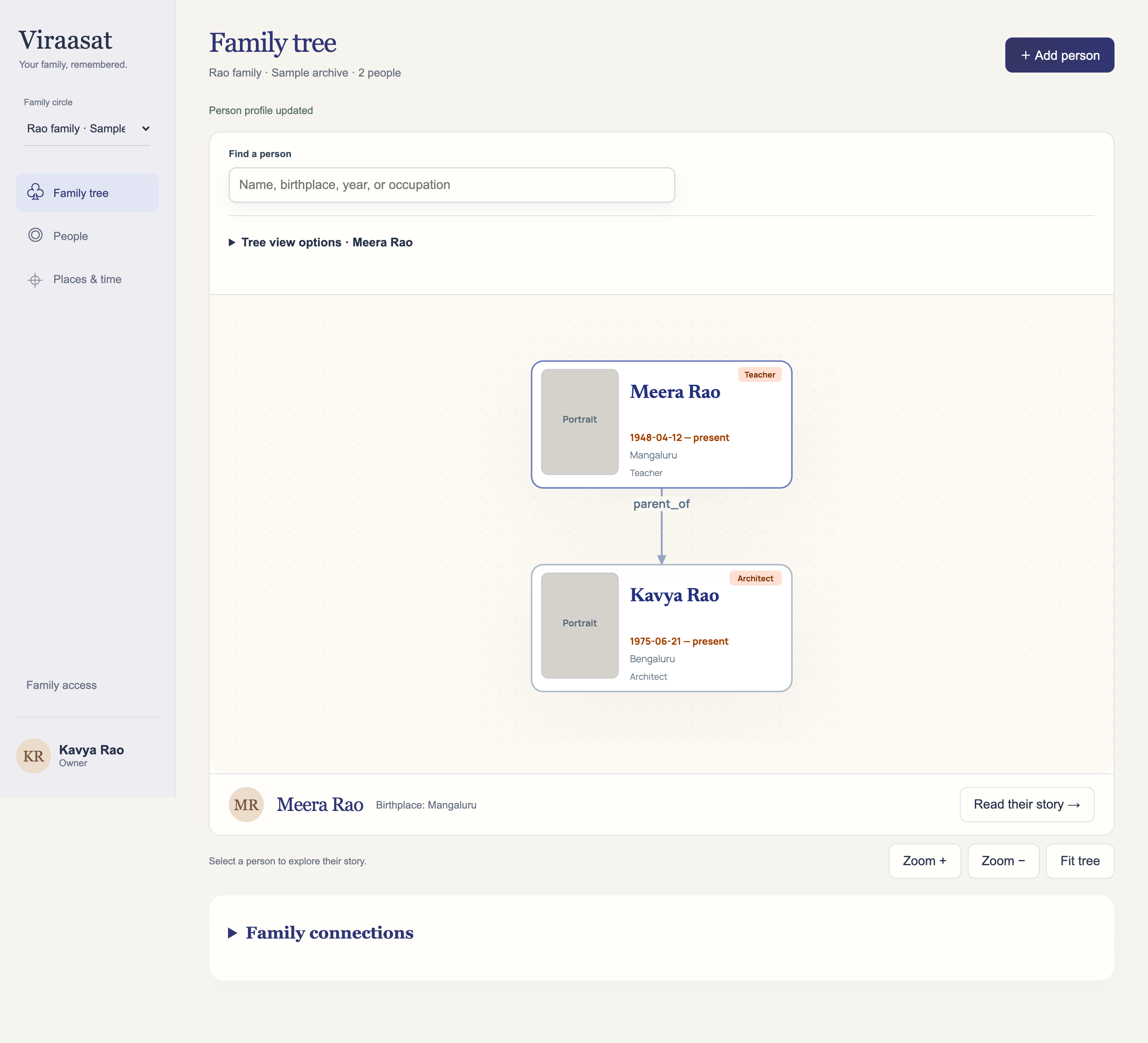
01 / Explore lineage
Follow the relationships
Choose a relative as the root, then follow parents, children, siblings, and partners through the graph. The same family also appears as a timeline, so a name sits within the years that person lived.
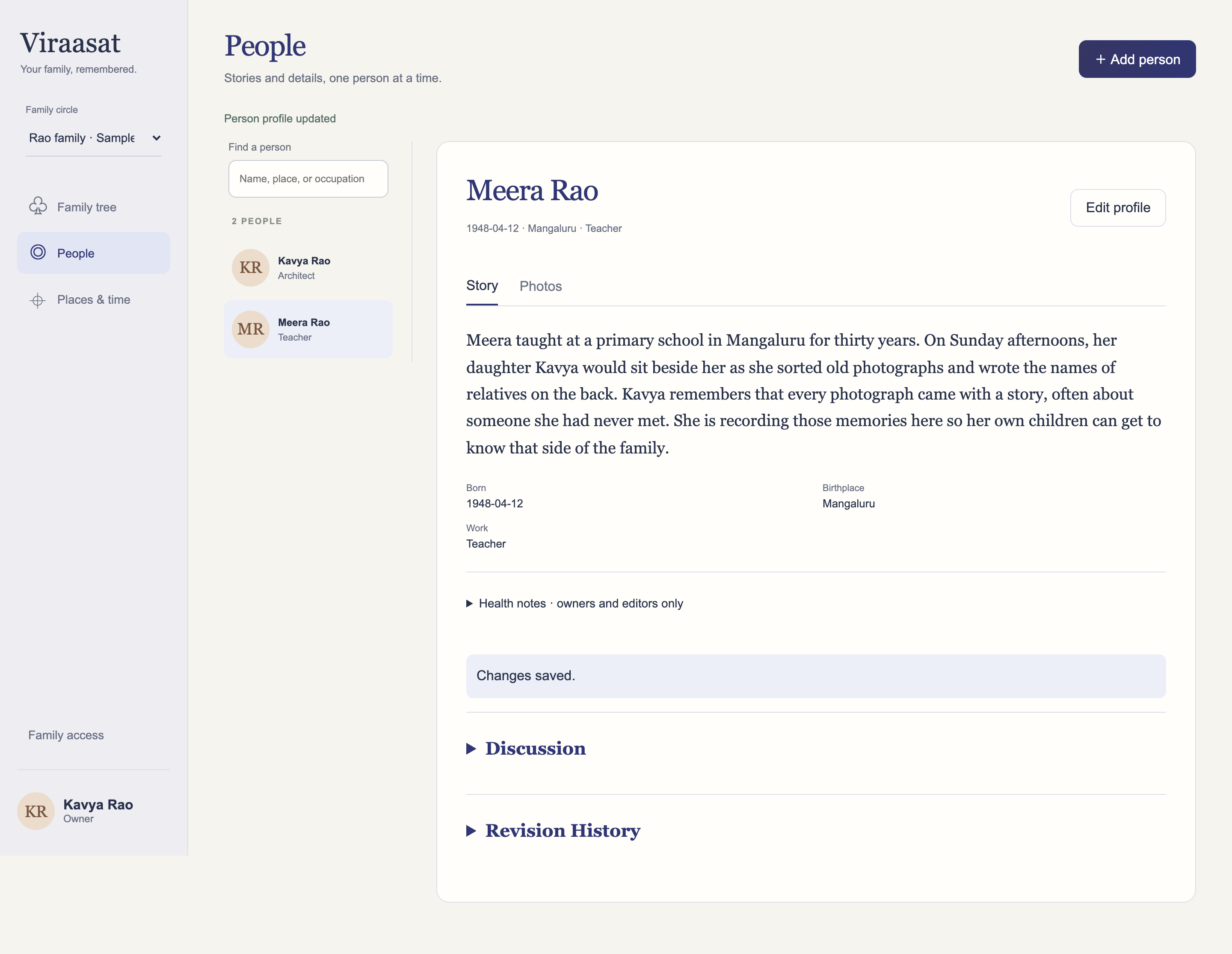
02 / Preserve stories
Read and contribute to someone’s story
Each person has a profile for the details a family remembers: places, work, dates, and a written story. Relatives with editing access can add context and save revisions to that profile.
03 / Family access
Manage who can access the family archive
Members and invitations have their own page. Account actions remain separate from family records, and the server checks what each member is allowed to read or edit.
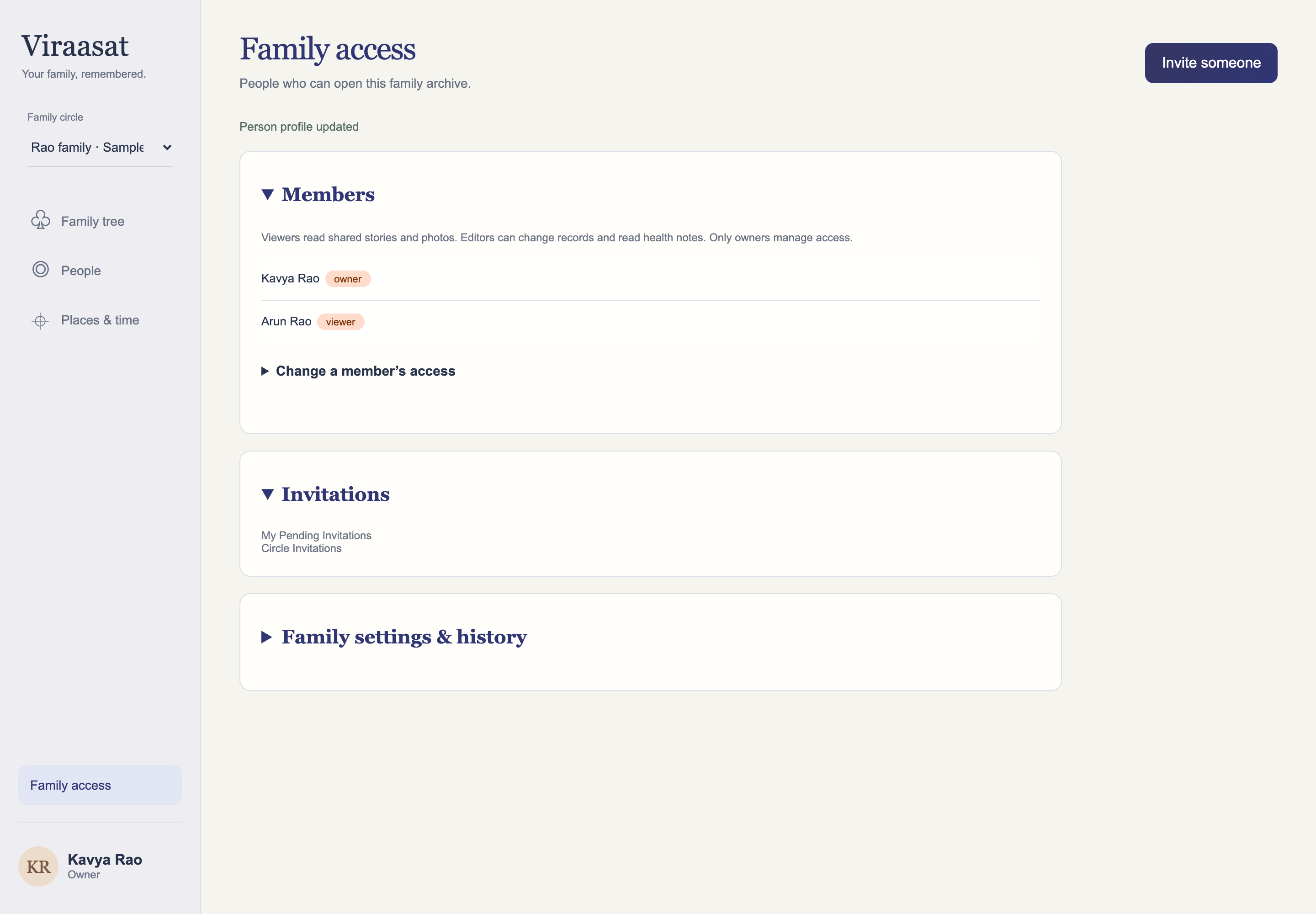
The Rao family shown in this walkthrough is fictional. The hosted app currently admits approved Google test accounts; anyone can read this page without signing in.
Product journey · From guided stories to a focused workspace
Making it easier to tell a fuller story
V1 was the first hosted version. It proved that a family can save people, stories, relationships, and photographs together. As I used it, I noticed that adding someone still felt like filling out a database row. The guided-entry update brought a gentler way to add a relative, alongside smaller fixes that came out of testing.
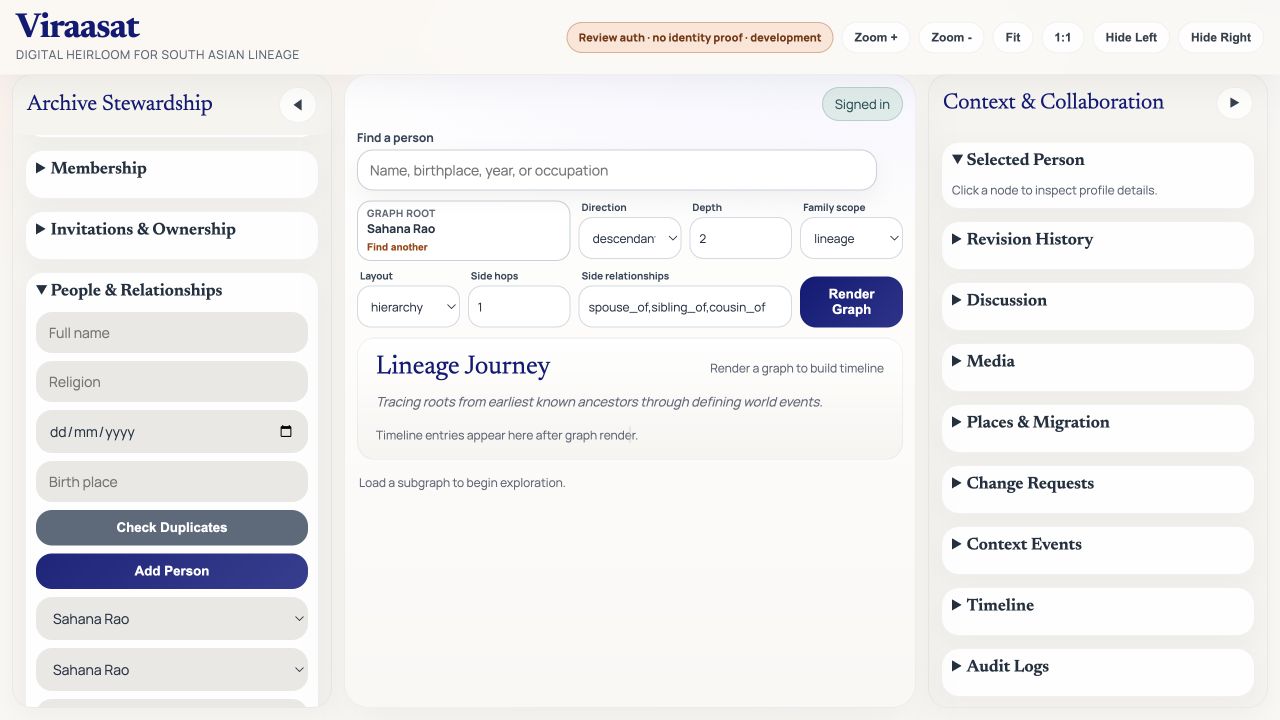
V1 · Original build A short form in the sidebar
The old flow asked for a name, religion, birth date, and birthplace. Linking the person required a second form below it. That was quick to build, but it gave little encouragement to record the details I was hoping families would remember.
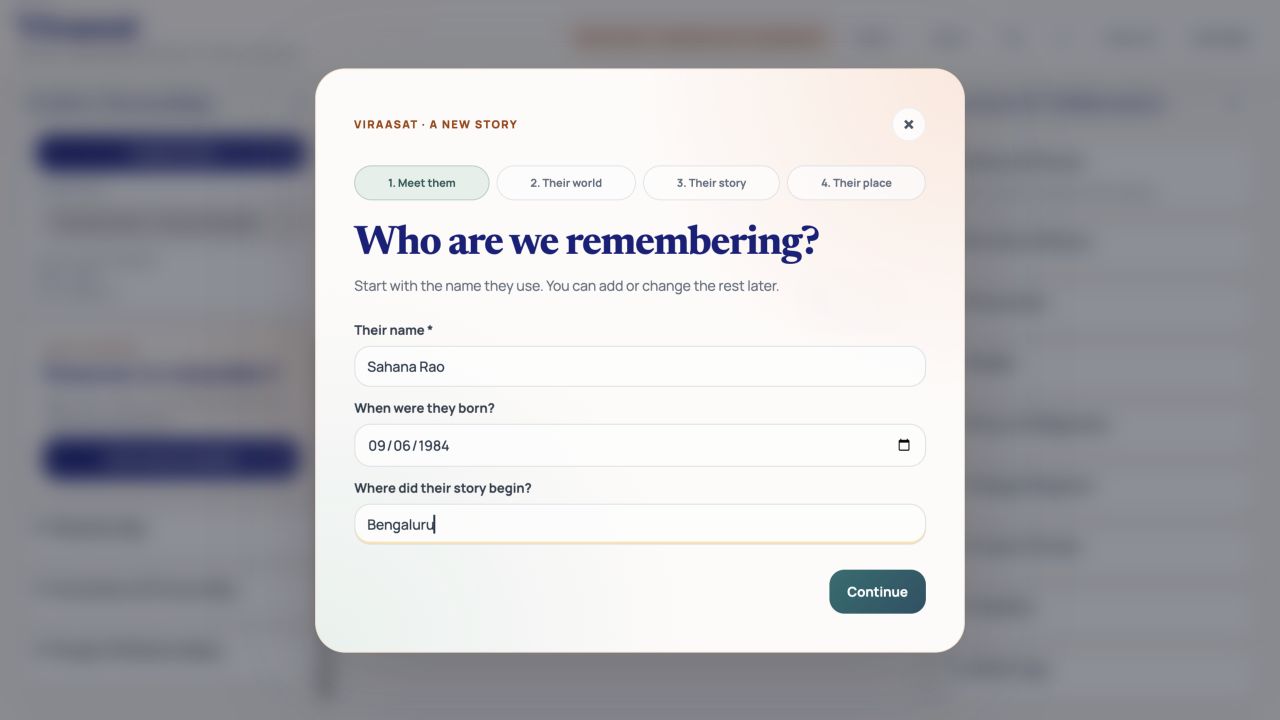
Earlier release · Guided entry Begin with the person
The new flow opens a focused, four-step dialog. It starts with a name and place, keeps the draft when someone goes back, and checks for likely duplicates before they continue.
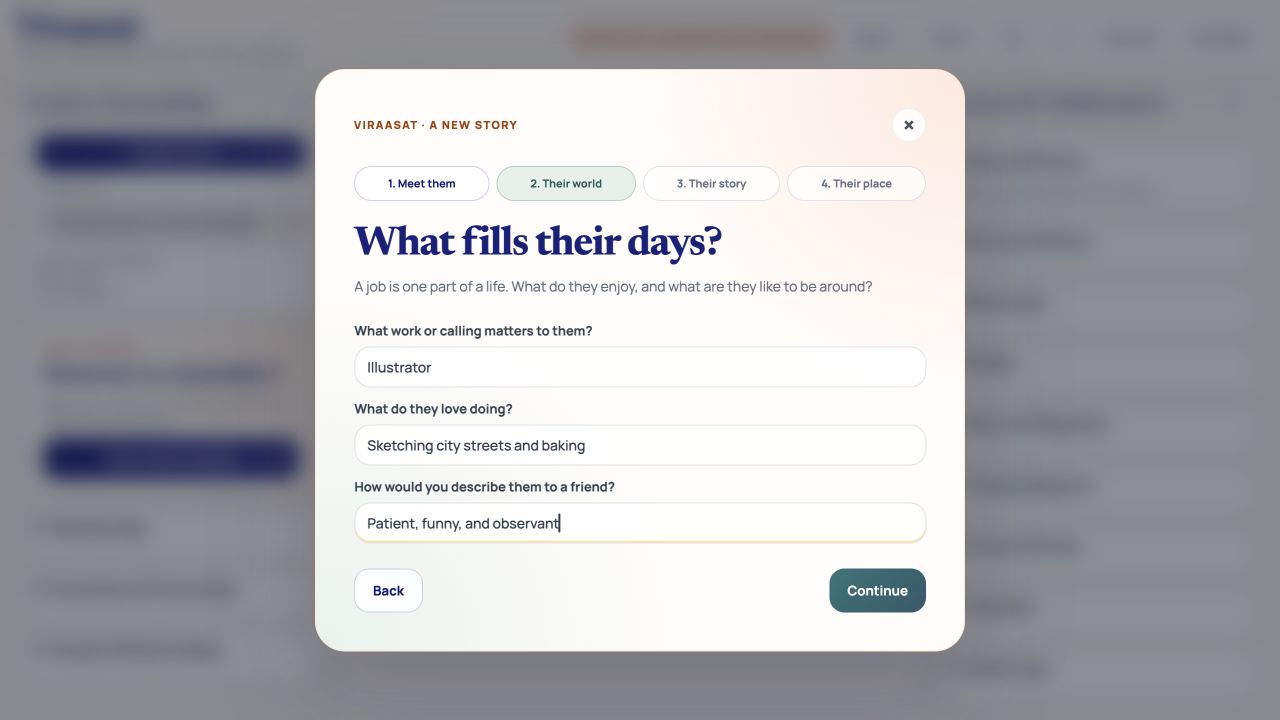
Earlier release · Guided entry Ask about everyday life
Prompts for work, hobbies, and personality make space for the things that rarely appear in a family tree. Each answer is optional; someone can begin with what they know and return later.
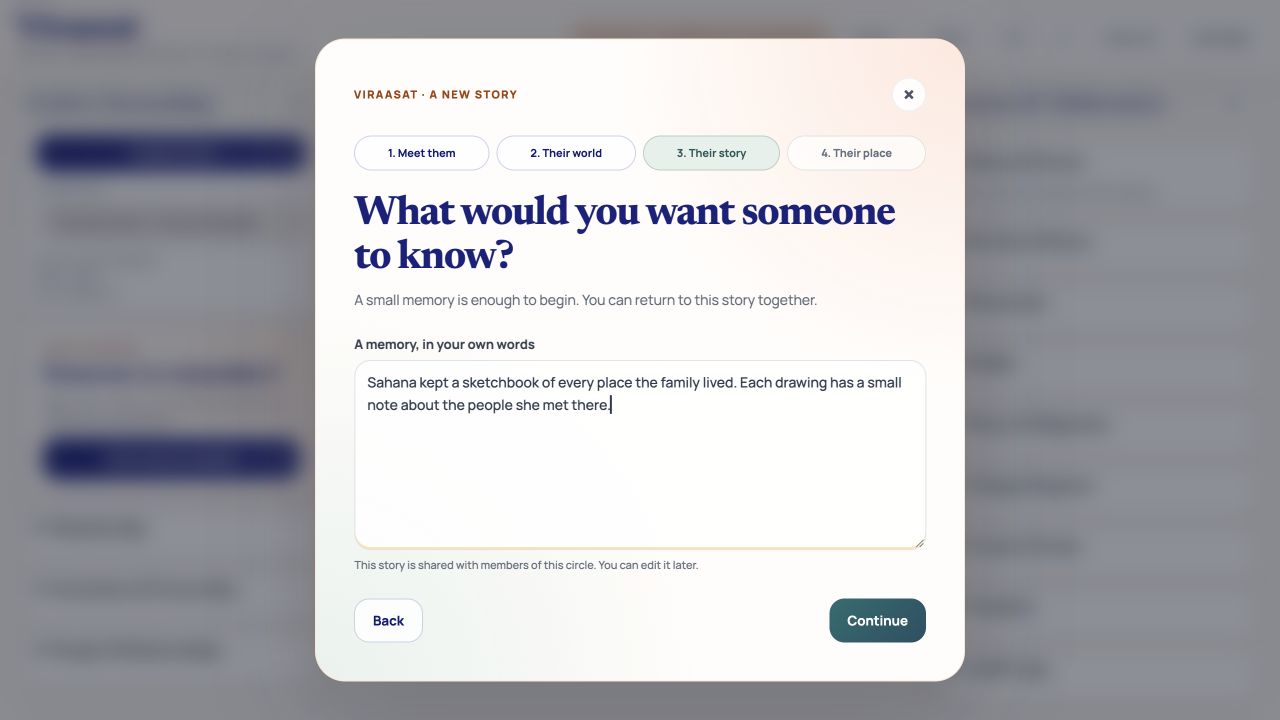
Earlier release · Guided entry Start by recording one memory
The story prompt can hold a small recollection without making someone write a full biography. I want the first contribution to feel approachable, then let relatives add context over time.
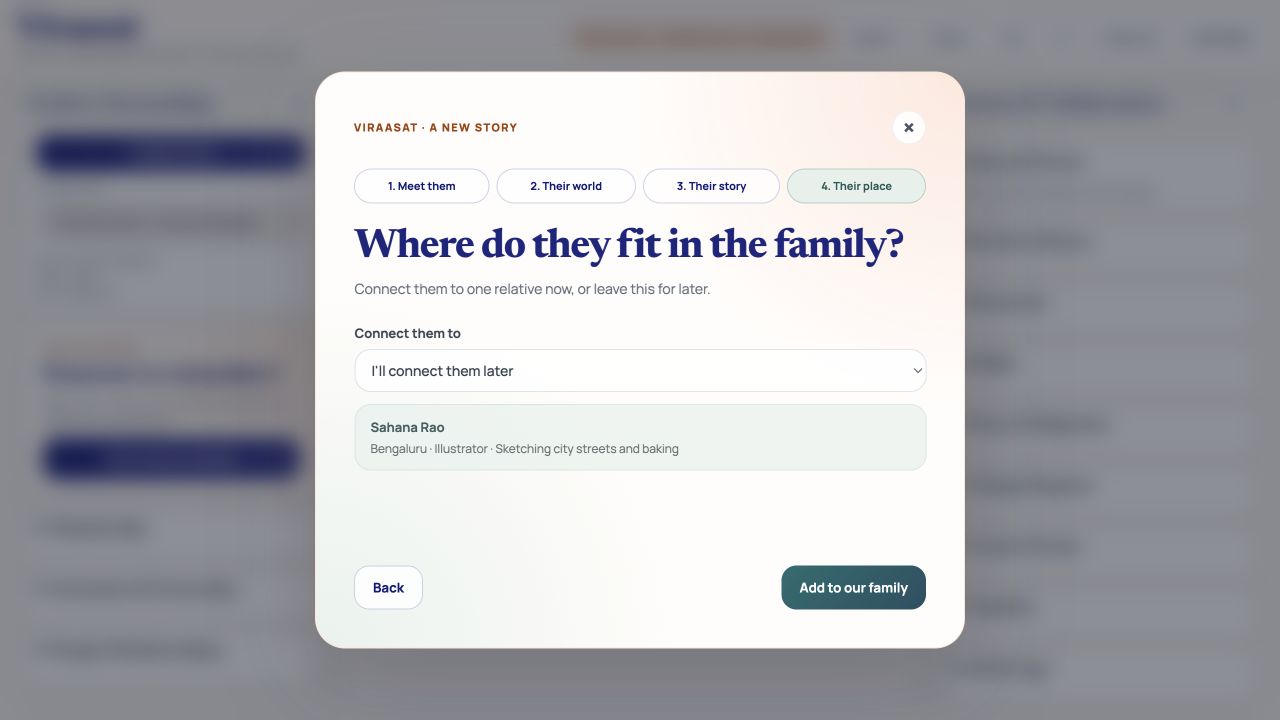
Earlier release · Guided entry Make the connection clear
The relationship is chosen in plain language in the same flow. If the link fails after the profile saves, the app says so and offers a retry rather than asking someone to create the person again.
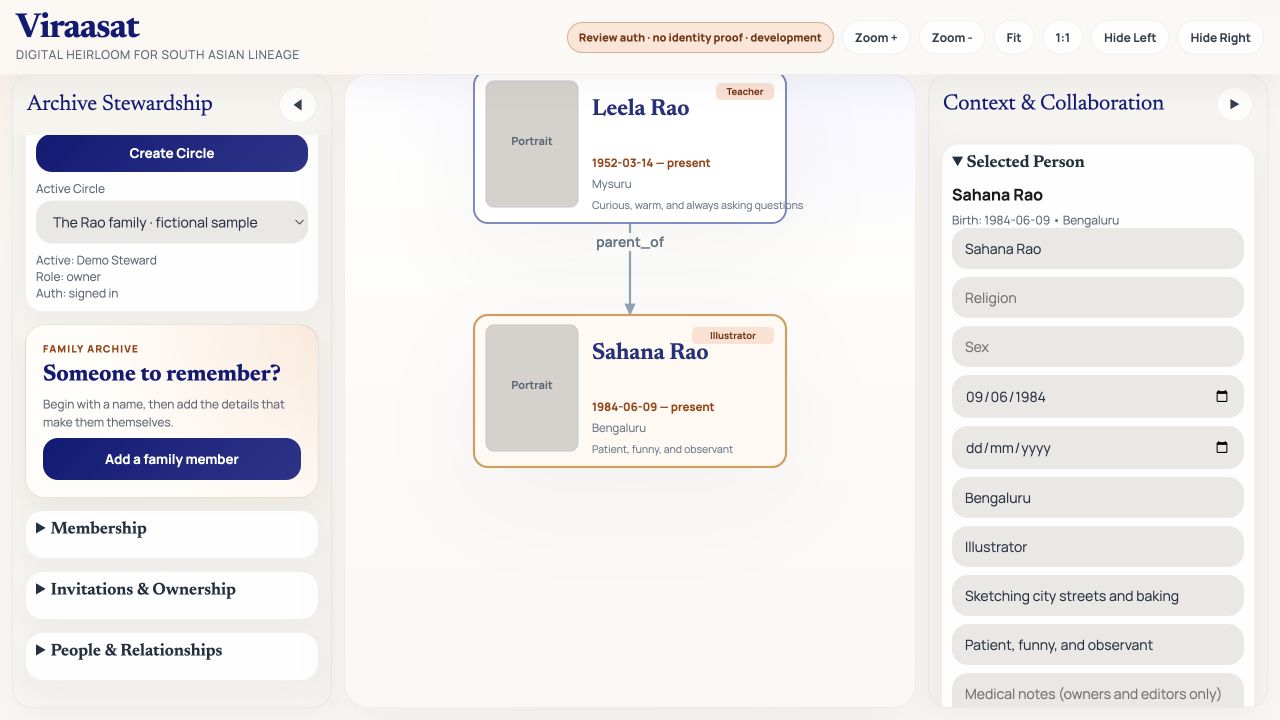
Earlier release · Guided entry See them join the tree
After saving, the view moves to the new relative and briefly highlights their node. The motion has a reduced-motion fallback, so the result stays clear without depending on animation.
01 / Previous five-space workspace Moving controls did not resolve mixed tasks
Home, Tree, People, Places, and Circle separated the original single page, but duplicate Add someone buttons, navigation cards, and shortcuts still competed for attention. This stage is documented from the audited source at commit 24ecf34; a before-interface capture is not yet included.
02 / Heuristic audit Give each page a clearer purpose
Three findings guided the work: competing starting points, reading mixed with editing, and account management mixed with family content. I reviewed 27 UI Tenets & Traps after firsthand product feedback. I examined the interface source against the tenets; moderated sessions with users are still planned.
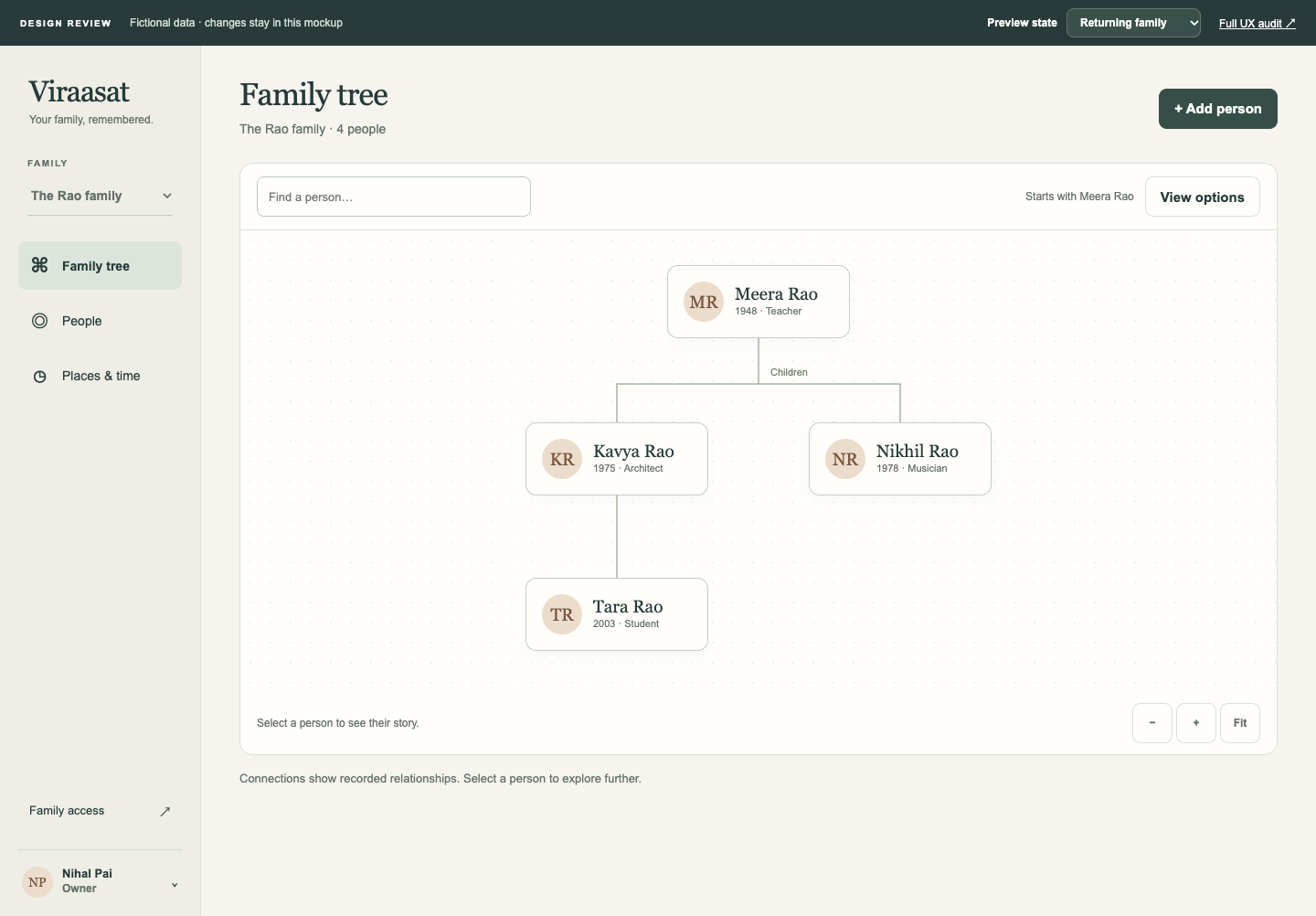
03 / Approved prototype Try a smaller navigation model
The clickable prototype proposed Tree, People, and Places & time as primary destinations, with Family access separate. It let me review the structure before implementation. This prototype uses fictional data to demonstrate the proposed interactions.
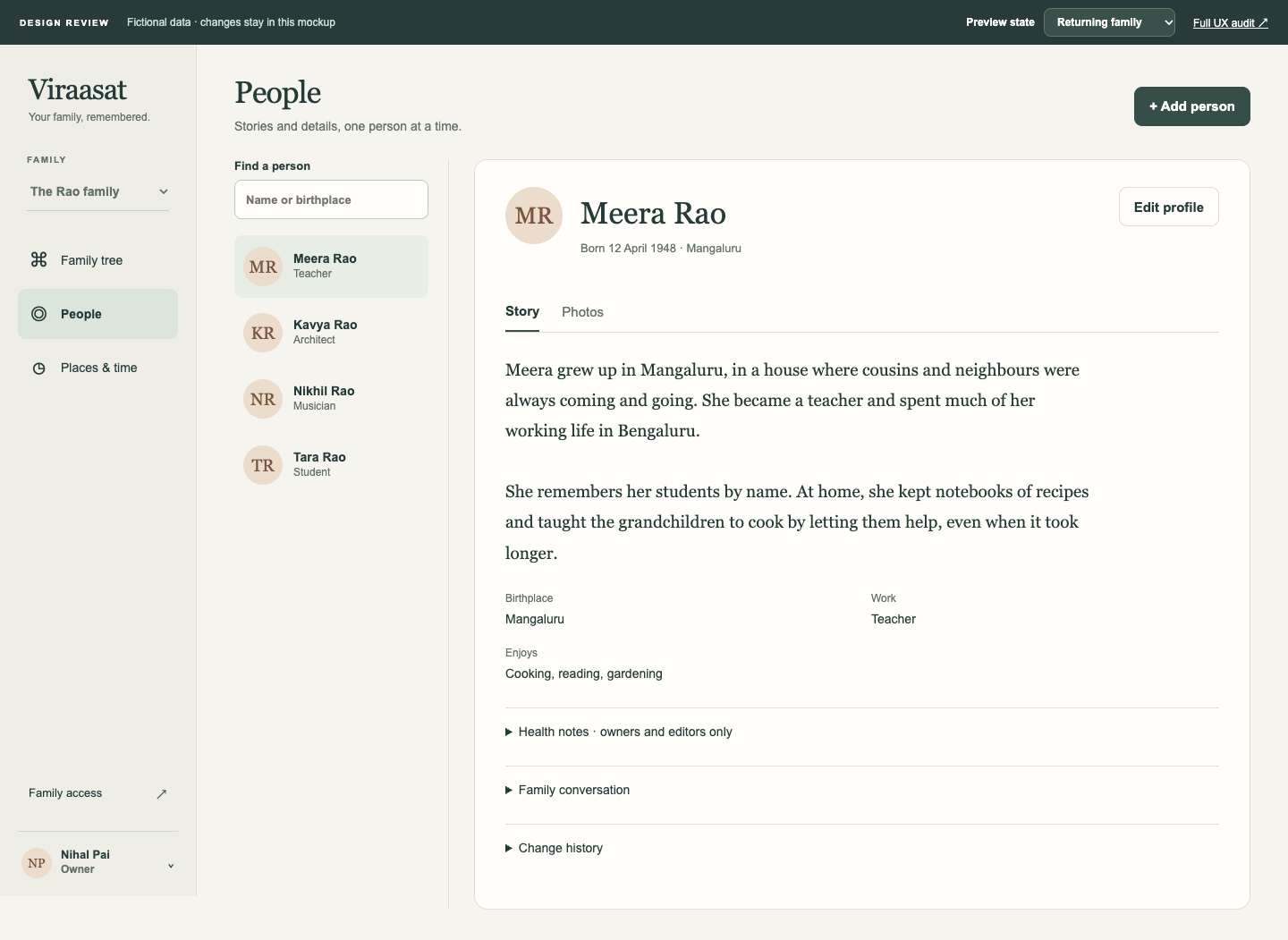
03 / Approved prototype Make reading the default
The proposed profile foregrounded a person’s story and made editing deliberate. This prototype helped explore the hierarchy; its sample graph and photo placeholders were not production components.
V2 / Focused Family Workspace Start with the family tree
Tree becomes home and automatically loads a bounded initial view. One Add person action belongs here and on People. The general dashboard becomes less prominent; advanced controls retain Apply view for changes and retries. The family tree appears without a manual setup step; loading time still depends on the hosted service.
V2 / Focused Family Workspace Spend time with a person’s story
Story and Photos lead the profile. Editing is deliberate, with conversation, revisions, and authorized health notes secondary. Failed profile saves retain input and show contextual feedback.
V2 / Focused Family Workspace Separate access from family content
Family access holds members, invitations, and secondary settings. Account holds the invitation code and sign-out actions. One family picker maintains context. Existing-member access changes still use a secondary form.
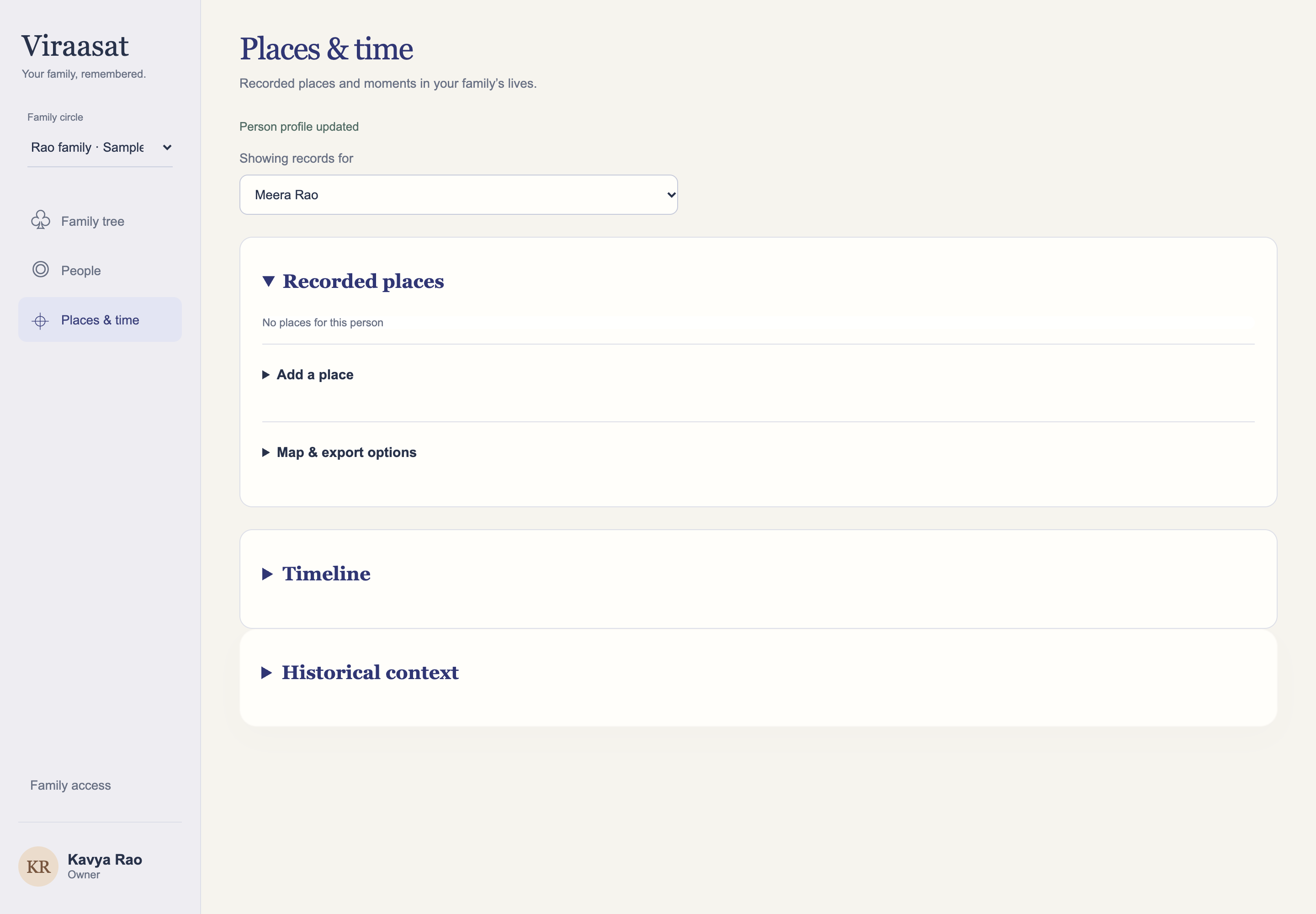
V2 / Focused Family Workspace Read recorded places first
Adding places, map/export options, and historical context move into secondary sections. Existing information comes first; this release adds no geocoder or inferred migration paths.
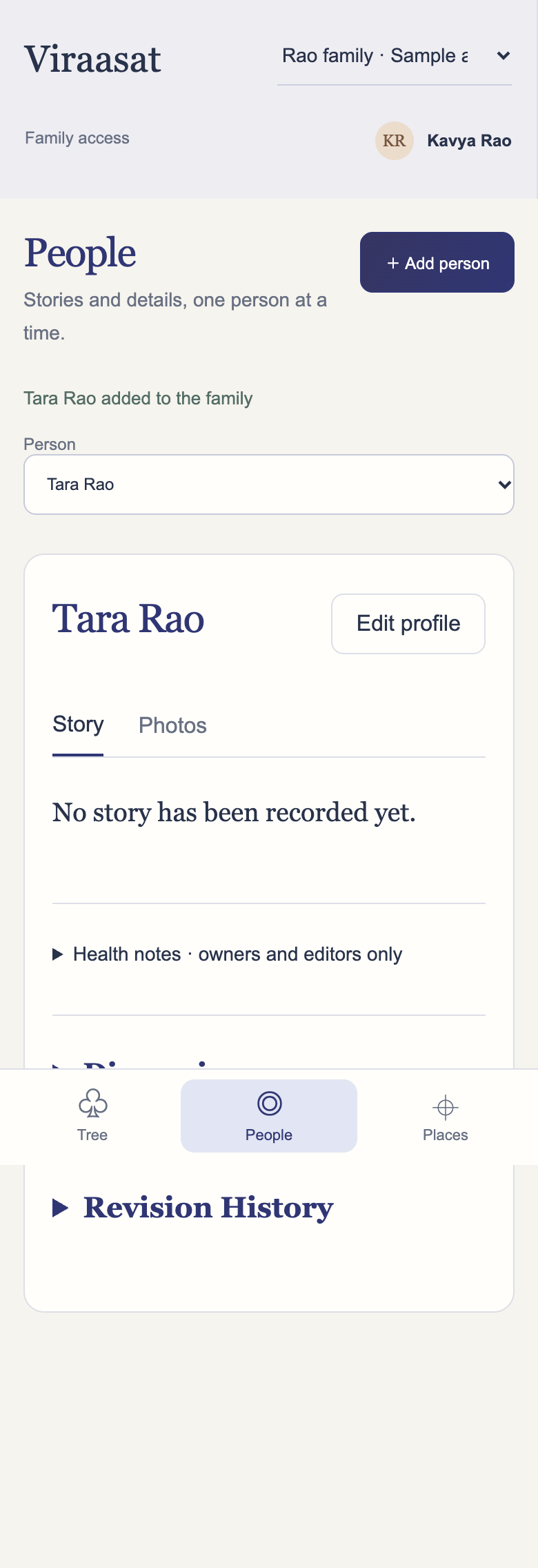
V2 / Focused Family Workspace Keep mobile navigation focused
Three primary destinations and a person selector support the smaller screen. Compact headers, warm neutrals, indigo accents, and consistent controls reduce visual competition to give the content more prominence. Research will test how well this works for families.
The earlier journey screens use a fictional family in a local review build. Prototype panels are labeled separately. Focused Workspace implementation screenshots show fictional records in an authenticated local test environment. The guided add-person journey has since been released to the approved-tester app.
Smaller fixes from V1 testing
I also made the interface type more consistent, rounded the sample family button to match nearby controls, added a copy action and brief instructions for invitation codes, and removed the old personalised welcome message after sign-out. These are small changes, but each removes a moment of confusion I found while using the app.
V2 · Focused Family Workspace · October 31, 2026
Giving each page a clearer purpose
After moving Viraasat into separate pages, I could still see how much of the original single-page interface had carried over. Adding someone appeared in several places, account settings sat alongside family records, and reading a story meant looking through controls intended for editing it.
I reviewed the interface against a set of usability tenets, then worked through a clickable prototype before implementing the changes. I wanted each page to have a clearer purpose: explore the tree, spend time with someone’s story, or understand the places connected to their life. Managing access should be easy to find without competing with those activities.
November 1: refining the expanded views
After reviewing screenshots of the release, I found that expanded forms and tree controls still needed work. The next update separated controls from the graph, improved the small-tree fit, and corrected labels and spacing in the place forms. I also restored the indigo identity. The implementation screenshots here show this refinement at commit 7bff313, using fictional local test records.
Keep depth optional
The guided add-person journey remains. After entering a name, Skip optional details offers a shorter route while preserving duplicate checks and recovery if a relationship fails to save. The prototype’s single form did not replace that journey wholesale. Relationship sentences, Generations, and Tree starts with replace technical wording. Birthplace is labeled as birthplace, rather than Home, which could imply current residence.
Protect edits without keeping private drafts indefinitely
Profile drafts survive page navigation. Relevant subject changes and editor-close actions warn before discarding work; failed saves preserve input with local feedback. Drafts stay in memory and clear on sign-out. No new persistent browser storage was introduced for them, deliberately favoring clearing private information over recovery after closing the browser. Some secondary forms still use page-level status feedback.
Move the controls, keep the permission checks
The production workspace retains the real graph, media, timeline, and API-backed forms. This presentation-layer release reuses existing handlers. Changing where an action appears does not change who is allowed to perform it: the server still enforces permissions and redacts medical notes. Database schema, backend authorization, approved-tester admission, session-cookie and CSRF protections, private media tickets, and storage configuration are unchanged.
What the release checks establish
Authenticated local browser checks covered profile saving, retained input after failed saves, cancelling person changes, navigation, media, adding a person, mobile overflow, and sign-out. A separate viewer account could not edit profiles or see medical-note text. These checks confirm the implemented behavior. Understanding how families experience it will require observing their comprehension, satisfaction, and ability to complete tasks.
Render deployed the exact commit. Hosted assets matched the committed files, health returned success, and anonymous circle requests returned 401. Hosted Google owner/viewer sign-in was not repeated during this release’s final verification.
What I want to learn next
I will continue using the 27-tenet audit to review the interface as families use it. This release moved advanced tools into secondary sections while retaining much of their existing behavior, so those interactions still need evaluation. The next round of research will ask:
- Can someone find a relative, read their story, and add another person without instructions?
- Can they distinguish a person in the family archive from an account with access?
- Can they explain who can see medical notes before granting editor access?
- Do optional prompts encourage richer stories without slowing quick additions?
- How does navigation hold up with larger families, keyboard use, and assistive technology?
Context and collaboration
Build the record together
A cousin who remembers a different detail can add it through revisions and discussion, keeping their contribution with the family record. The app also has places and migration, context events, timeline, and audit panels. I am still working on how those pieces should connect: a move to a new city or a world event matters most when it helps someone understand the choices a person made at that point in their life.
Product journey · Earlier release · Family permissions
Keeping a shared archive private
Inviting relatives made Viraasat more useful, but it also raised a practical question: which family’s stories should a signed-in person be able to see? Google can tell the app who someone is. It cannot decide whether they belong to a particular circle, can change a profile, or should see medical notes. The API makes those decisions in the API, for each family record.
The interface shows a viewer that their access is read-only, but a disabled field is only a cue. The server checks membership and role even when a request is sent directly or a resource ID is changed.
The API also records circle actions and sanitized request outcomes. The backend currently uses a privileged Postgres role, so FastAPI remains the per-family authorization boundary. Database row policies do not yet enforce per-family access for backend requests.
Changes to family permissions
Swipe the table to see each permission decision.
| Area | Earlier behavior | Decision and reason |
|---|---|---|
| Admission | Google sign-in and the consent-screen tester list | The API also checks a verified email against a small approved-tester list. Google identity alone does not open the archive. |
| Circle permissions | Membership and role checks in individual endpoint helpers | Named, fail-closed actions give the API one policy vocabulary for viewing, editing, inviting, and managing a circle. |
| Sessions | A hashed bearer token held in browser storage | Hosted sessions use an HTTP-only, Secure cookie with a CSRF check. Account-wide sign-out revokes app sessions and their media tickets. |
| Invitations | Invites were tied to a recipient and pending state | Invites now expire after seven days, can be revoked by an owner, and cannot be replayed to gain access again. |
| Private media | A private bucket served through an authorized API proxy | The API keeps that proxy, binds short-lived media tickets to the app session, and limits upload volume. This costs backend bandwidth but lets sign-out end access. |
What those roles look like
Scroll through four screens from a local build with fictional people and families.
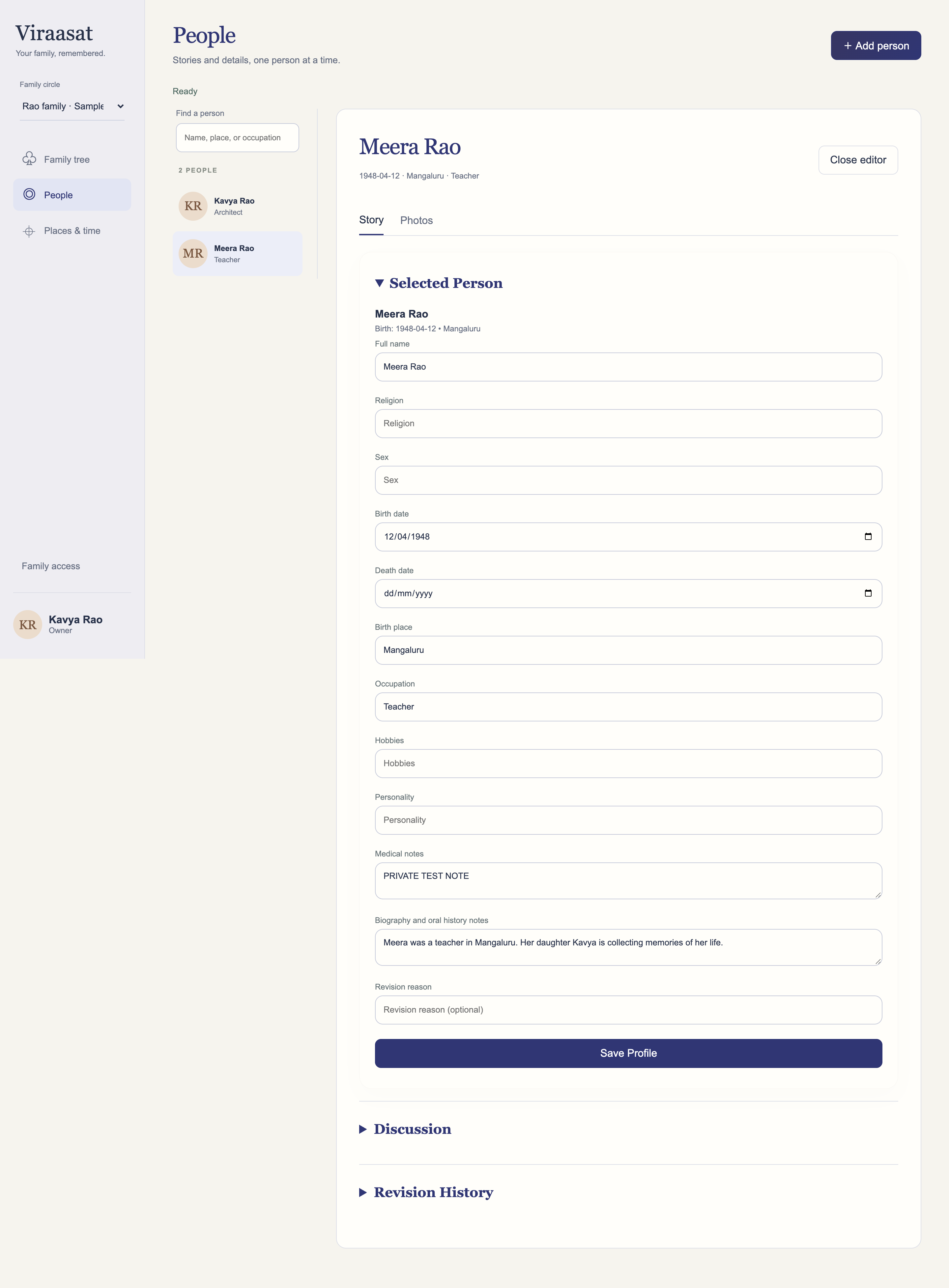
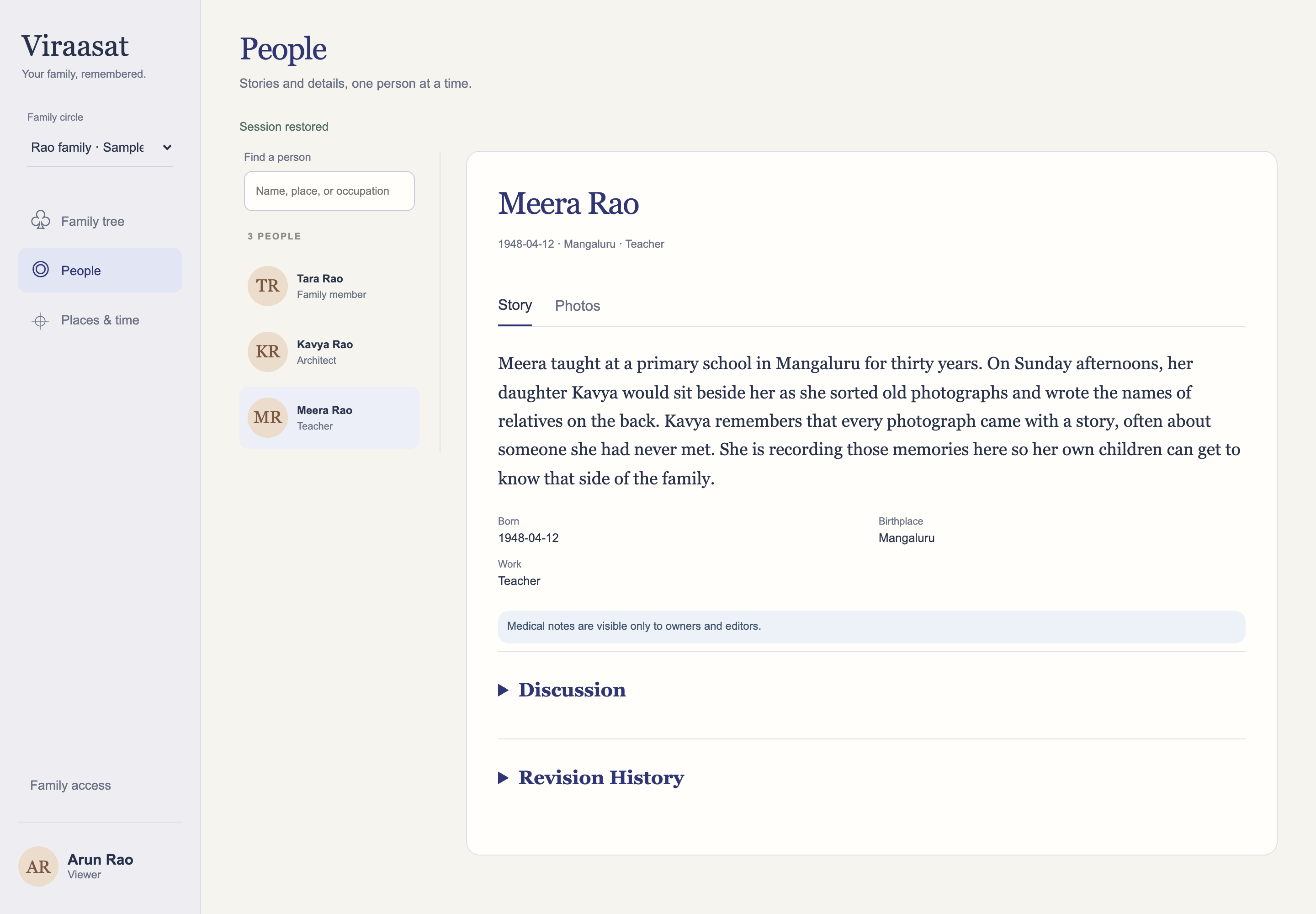
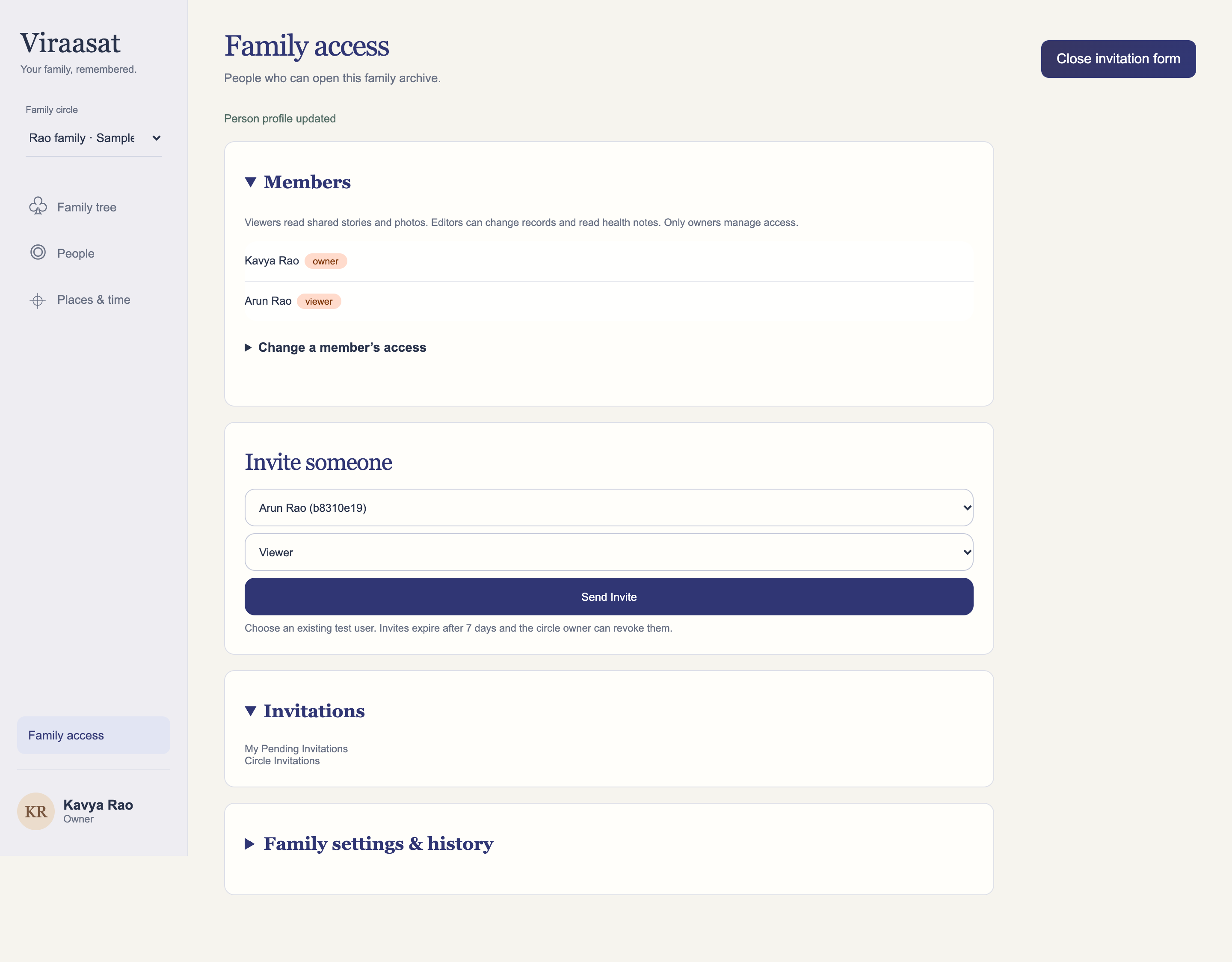
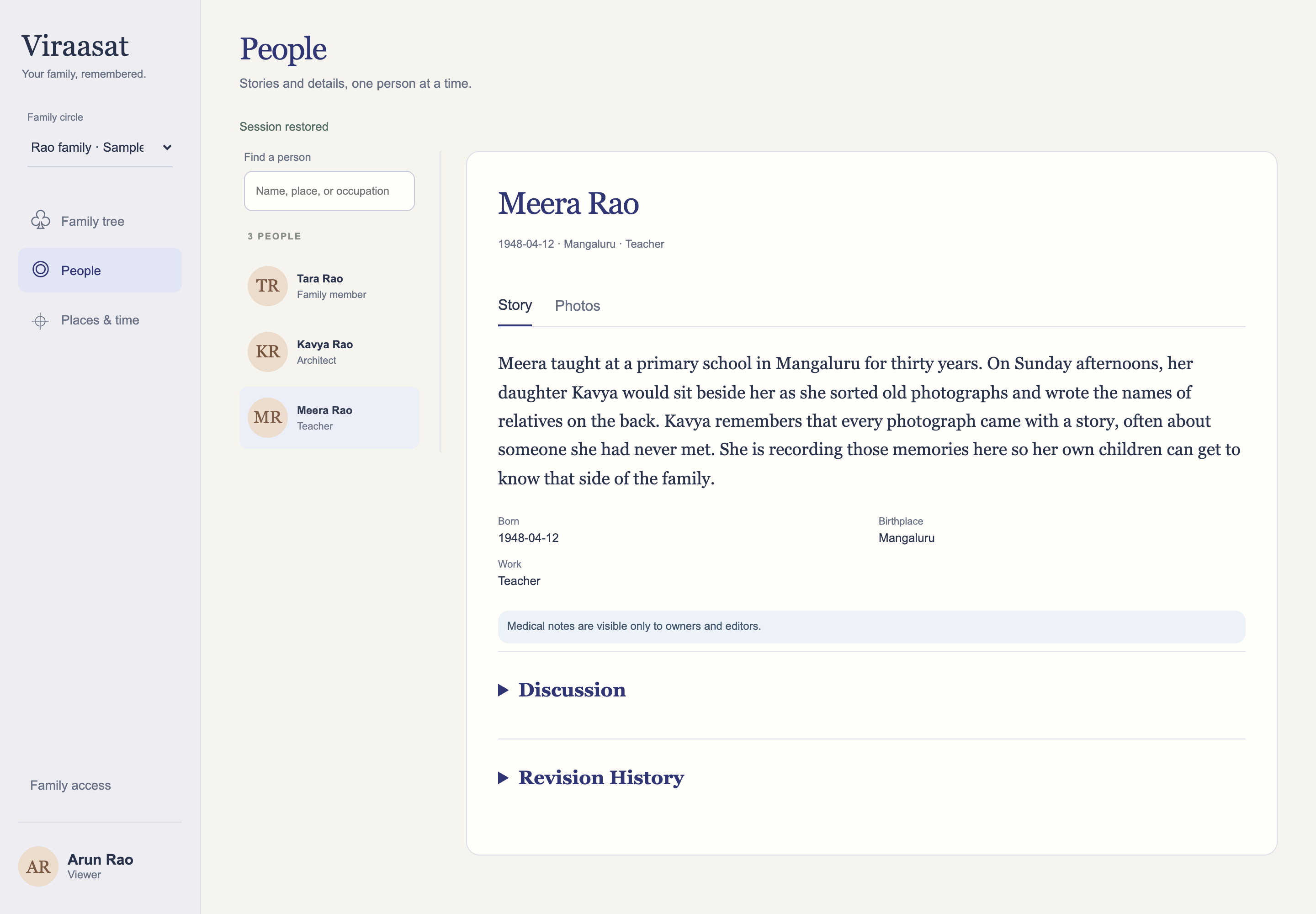
These current V2 screenshots use fictional records and separate authenticated local owner and viewer accounts. They illustrate the interface with local authentication. Hosted Google sign-in was checked separately during the earlier security release.
Regression evidence
Check permissions through direct requests
Local tests use two fictional families to check that changing a circle or person ID cannot reveal another family’s data. A viewer write request with a valid CSRF token still gets a 403 and leaves the profile unchanged. Tests also cover revoked sessions, private media tickets, invitation misuse, and unsafe uploads. The full disposable-Postgres run passed 112 backend tests, including 12 Postgres checks, and 16 frontend tests.
Hosted acceptance
Try it across accounts and browsers
In the approved-tester app, I confirmed that an unlisted Google account was rejected. An invited viewer could read the shared family, but could not edit profiles or see medical notes. “Sign out on all devices” ended sessions in Safari and an Incognito Chrome window; after sign-out, a previously opened private image link returned an invalid-ticket error.
The approved-tester release still has security work to complete. Direct forged-request checks against the hosted API, a full backup-and-restore drill, consent controls for living relatives, and per-family database RLS remain open work. An authorized relative can also save or share what they can see.
User research · Opening beta testing
Learn how families build the record together
I am opening beta testing to learn how these different family roles contribute, individually and together. The working product is a starting point for research; the audience assumptions and intended benefits above still need to be tested.
The proposed first research session follows a small task: add a relative, save one memory, and identify something to ask another family member. I want to observe where people hesitate, what they leave blank, whether the prompts help them remember, and whether they understand who can see and edit their contributions. A follow-up would explore whether they had that conversation and returned to add to the story.
Success would mean families can preserve a meaningful memory without feeling they must complete a biography, and feel comfortable inviting someone else to contribute. I plan to look for these behaviors during research.
What I want to build next
Viraasat is still being built. The current app can hold people, relationships, stories, images, and contributions from invited family members. I want to go further than collecting entries. I am working toward a more natural way to capture oral histories, and a timeline that places someone's life beside the events they lived through. I also want maps to show how a family moved across cities and countries, so later generations can follow those moves and understand how they affected the family.
The current app keeps medical notes hidden from viewers. Longer term, I want to explore an opt-in family health history. Patterns involving conditions such as diabetes or mental and behavioural health can be hard to piece together when the information is scattered or never written down. This connects with my interest in health technology and bringing fragmented medical records into one clearer picture. Exploring this would require consent and careful decisions about how families share sensitive information. The current app provides no diagnostic functionality.
For now, this is a small tester deployment on Render and Supabase free tiers. The hosted service may take a moment to wake up, and Google sign-in is restricted to approved test accounts while I keep building.
Request tester access first. Approval is required before Google sign-in will work, and an invitation is required to enter an existing family circle. The walkthrough above is available to everyone.